Tuesday, August 19, 2014

Enabling Wifi Tethering on a Freedompop Galaxy S3 phone

Quick summary for anyone in a similar situation and wants to get wifi tethering to work on a FreedomPop Samsung Galaxy SIII  (S3) Phone:

This app from the Google Play Store worked for me.  I emailed the developer with my question, and he got back to me promptly, stating that his app should work on the S3 and he would refund my purchase or provide support if it did not.  You can't get any better than that!

Wifi Tether Router
https://play.google.com/store/apps/details?id=net.snclab.wifitetherrouter&hl=en
website:
https://sites.google.com/site/wifitetherrouter/
The app costs $2.50

Here's the problem I encountered and some of the other solutions that I tried:
I have a Freedompop Galaxy S3 phone.  I bought it because the Freedompop representative in a woot.com product forum stated that the Galaxy S3 phone would allow wifi tethering.  The Freedompop FAQ pages also stated that the Galaxy S3 phone would allow wifi tethering.   Freedompop uses the Sprint network.


(Bad, FreedomPop, bad.  Here's the response that I received from their rep, which was not what they promised when I bought the phone! :

FreedomPop inbox@my.nanorep.com


Dear Norbert Wu,

The reason why you cannot enable wifi tethering on your device is because it requires an active subscription to the Premier plan. Tethering on the Galaxy S3 is only accessible with the Premier plan. I currently have on file that you are subscribed to our Pro 500MB plan. You can always call our support line to upgrade your plan and receive more information.
Thank you for your support!
Your Personal FreedomPop Support Agent,
Florencia)

I've attempted numerous times to enable wifi tethering on the phone using other software including the included Freedompop Wifi Tether app.

I believe that Freedompop needed to contact Sprint and ask them to allow this phone to allow wifi tethering.   Good luck with that.  FreedomPop's customer service is not exactly helpful.

I researched this issue for several hours and learned that this phone has Android 4.4.2 KitKat, which has some kind of hidden "KNOX" software that does not allow any normally-used wifi tethering apps to work.

I have used Root Check, and it seems that the phone is rooted.  I have tried to remove the KNOX software using Terminal Emulator but I don't believe that did anything.  I've tried wifi-tether-Trevemod also which did not work and told me that there were errors and I should look at the log file -- then told me that the log file did not exist.  It seems that the app wifi-tether-Trevemod only works with phones up to Android 4.3. 

I also tried Foxfi and PDANet.  The phone did allow USB tethering using PDANet.
With all the above wifi tethering apps (FreedomPop, Foxfi, TreveMod), here's what happened:

Under Settings-Connection, when I attempt to enable "FreedomPop hotspot"; I get the following error messages:
“hotspot error --
you are not subscribed to the hotspot service, do you want to see subscription options?
Cancel or OK.

Selecting OK gets:
"Welcome to self service" (grayed out).  Then:
Self Service: Information: sorry experienced a system problem during your task, please dial *2 from your Sprint phone or call custom care at 888-211-4727 from another phone to complete your task”

I tried calling Sprint customer service, and the agent told me that they could not help -- that FreedomPop had to set the phone up properly (provision it).

Before using the Wifi Tether Router app that works, you need to be sure that your phone is rooted.  My phone came rooted already.  Use the free app "Root Checker" to see if your phone is rooted.   I would not advise trying to "root" your phone if it is not already rooted.  Rooting your phone will void any warranty.

(Update: on a new phone, I installed Root Checker, which told me that my phone was not rooted.  I then used SuperSU to root my phone.  It hung up on the message "disabling Knox" which is something you DO want it to do.  After checking forums, I found that this is a common problem.  Just restart your phone and you should now have rooted your phone.  The Wifi Tether Router App should now work.)

Friday, August 15, 2014

What to Know About Paper Shredders...Who Knew?

Life is getting more complicated.  Now I learned something new about paper shredders. 

I just bought my third shredder, from Costco.  My first two died.  The second one is a Royal as is my new one. 

First, if you buy a new Royal shredder, it won't look new.  I opened mine up and there were bits of paper already stuck in the shredder.  It worked fine and looked new otherwise.  I found this in an Amazon description:

" A few pieces of shredded paper may be found inside the shredder and the waste basket. This is normal. All Royal shredders are tested at the factory to insure quality."

I've also learned that you can only run paper shredders for three to six minutes at a time.  After this amount of time (which is often written on the back of shredders), you want to stop shredding to allow the motor to cool off.  Otherwise you may end up with a dead shredder. 

Here's what the Royal manual says:

The 1212X will automatically terminate power during any of the following abnormal situations:
1.  Operating the shredder at the maximum capacity continuously for a
prolonged period of time....
2. Exceeding the shredding capacity..., or if the paper is not fed squarely into the
feed opening.

Both abnormal operations may result in the activation of the automatic thermal motor overload
protection circuit, which terminates the power to the unit.

In case of a major paper jam:

1.  Unplug the power cord from the AC outlet and wait at least 25 minutes
for the thermal overload protection circuit to reset.

2.  Plug the power cord back into the AC outlet and press the ON/OFF button.  Press the Reverse Button and pull the remaining paper out of the cutters.

3.  With the Main Switch in the
auto position and the feed opening clear,
you are now ready to resume normal shredding. 


I've had a shredder seemingly die, then work again after a few days.  The above explains this mysterious behavior.  There's some kind of devilishly complicated "thermal protection motor overload protection circuit" that keeps the machine turned off until the machine has determined that it has rested long enough. 


How to set up Wifi Tethering on a FreedomPop Evo Design 4G Phone

I've discussed FreedomPop and their services in past blog posts.  I still recommend them although you have to be careful in dealing with them.  My past blog posts give some warnings. 

I've had a FreedomPop Evo Design 4G Phone for several months now, and it is pretty much useless for voice calls.  I don't text much, but I have found that the phone gets my emails (it uses the Sprint network) well.  FreedomPop initially advertised that the phone would allow wifi tethering, but once I got the phone, they changed their policy stating that wifi tethering was not available.  I bought the phone for $100 and was a beta user.  Because of the problems with voice calling and the short battery life (the battery lasts less than 24 hours with minimal use); I hardly ever use the phone. 

Just today, however, I ran across the item below in a forum.  I tried it, and it works great!  I now can use my FreedomPop Evo Design 4G Phone as a wifi hotspot.  I get 500Mb of 3G/4G data free per month, and I can use that data when traveling, on any other device (laptop, iPad, etc) that needs a wifi or internet connection. 

Thanks, Adolfo and the guy who posted these instructions initially:

How to set up Wifi Tethering
Post by asdfasdf on Mon Nov 04, 2013 6:04 pm

Per Adolfo on the FP Facebook page. Edited from comments below too.

1) Open the "WiFi Tether" app that came stock.
2) Tap the menu key, select "Settings"
3) On the settings screen, change "Change Setup-Method" to "Netd (master)"
4) Uncheck "WiFi-driver reload 2"
5) Check "WiFi-driver reload"
6) Scroll down and select Change LAN, select "172.20.21.0/24"
7) For security, change the SSID, enable WiFi-Encryption, and set the passphrase. 

Though not all of these steps may be necessary, they should make it work for anyone.
Good luck!


Wednesday, July 23, 2014

I Try to Be Nice, Really, But....

I mentioned in an earlier blog post (or perhaps in my Facebook page) that I get few enough letters from kids now that I try to respond to them.  In the past, it was simply impossible to reply to all of them.  Oh, here's the earlier blog post: 

http://norbertwu.blogspot.com/2014/06/fan-mail-from-kids-always-brightens-my.html


I recently sent a card and a note to a Jacob, who wrote me and had an address of "400 Deering Avenue, Portland, ME  04103." 
The card was returned to me with a note: "need full name" with the standard USPS label of "return to sender, not deliverable as addressed."  
I hate having my efforts wasted like this, so I looked the address up.  It belongs to Temple Beth El:  Temple Beth El is a welcoming congregation of over 300 families in Portland, Maine, affiliated with United Synagogue of Conservative Judaism. TBE is an open and inviting kehilla (community) in which each congregant can find an opportunity for individually meaningful religious expression. 
Hey, Temple Beth El -- maybe one of your folks can let Jacob see that I replied to him.  Hey, I tried.  

Saturday, July 12, 2014

Weekly Series Number Eight: Favorite Images

School of Scalloped Hammerhead Sharks, Cocos Island, Costa Rica:


Thanks to all of you for your comments about my weekly series, where I show and talk about the stories behind some of my favorite images.  I've been trying to start with images from my early days, and then progress chronologically.

I remember seeing the first images of these schools of scalloped hammerhead sharks from Cocos Island (taken by a friend and mentor, Marty Snyderman).  Marty was one of the first underwater photographers to spend significant time at Cocos Island, and I saw his images back in the late 1980s as I was just starting to seriously take underwater photographs professionally.  I was lucky enough to be able to go out with a couple of the diving vessels that visited this remote island.  These images were taken on my first trip out there, aboard the Okeanos Aggressor.  I later visited Cocos Island a few more times, all on the vessel Undersea Hunter.   As far as I know, both vessels still visit Cocos Island, and despite all the hunting of sharks for their fins, these schools of hammerhead sharks can still be seen out there.


I had gotten tips from my friends (and bosses, when I worked on their films) Howard Hall and Bob Cranston.  This was in the days before relatively inexpensive rebreathers were available.  The trick, from what I gleaned, to getting images of these sharks was to get underneath them and to hold your breathe.  The instant you let out your breathe, then the entire school of sharks would scatter.  The school of sharks tended to swim around various underwater pinnacles near Cocos Island, hanging out around the thermocline, a pretty discrete boundary between warm, clear water and murkier, colder water.  The sharks seemed to like this boundary.  The boundary was generally right around 120 feet or so.

That first trip on the Okeanos Aggressor was something.  A group of divers from Boston had chartered the boat, but I had been able to get myself and my friend Peter Brueggeman on the trip.  Peter was a great friend and helpful to me underwater (and topside too!), and he had a great sense of humor and easygoing personality that helped offset my seriousness and antisocial behavior (I have really bad hearing, which contributes to my not enjoying conversations on dive boats -- I have a hearing aide but don't use it when I am on diving trips since it costs a lot when I forget I have it on and step into the water).  The funny thing about that trip was how nearly everyone in the group from Boston ended up romantically involved with someone else in the group.  There was a doctor who accidentally bumped into an old flame and rekindled the romance -- but also spent the entire trip anguishing over what would happen when he got back home and his wife found out about the affair.  There was a woman who targeted nearly every male on board and had a brief affair.  Peter and I were left alone, which was fine with me as I was more concerned about getting images.  I later discovered from one of the group that they thought that Peter and I were a gay couple!  This was pretty surprising to me.  It's happened to me a few times since, because I like to travel with my friends, and two guys traveling together must mean that they are gay, I guess.

I can remember the dives on that trip well.  Peter and I would go down a pinnacle called Dirty Rock, hang out at about 100 feet, looking off the pinnacle to catch a glimpse of sharks.  I'd see them infrequently, just at the edge of visibility, circling the pinnacle.  Once I caught a glimpse, I'd swim as fast as I could to the school, holding my breathe, and usually swimming upside down so I could see their silhouettes above me.  If I was lucky enough to find myself underneath the school of sharks, I'd have just a fleeting few seconds to snap a couple of exposures (using a Nikonos V camera loaded with 35mm film) before I'd have to let out a breathe.  The sharks would scatter at that point, and I'd look back the way I came to try to see the pinnacle.  Most of the time I'd see Peter's bright yellow fins, which were a lifesaver.  Thanks, Pete.

Getting back to the pinnacle was important; I sure did not want to lose track of where I was and have to surface in the middle of the usually-turbulent, rainy ocean off Cocos Island.  If I had not come back to where the other divers were, chances were good that the dive tenders would not see me when I surfaced, and I'd face a long time alone drifting.  That kind of scenario -- being lost by yourself, drifting away from your dive boat in stormy seas and low visibility -- is so frightening to me now that I probably would not do this kind of dive this way any longer. 

Sharks around the world have been targeted for years by fishermen who catch sharks only for their fins.  It's a tragedy.  The fins are valued as a delicacy by the Chinese (yes, I am Chinese-American) who make the fins into shark-fin soup.  Chinese folks try to serve shark-fin soup at wedding banquets, largely because it is very expensive, and serving your guests the most expensive dishes at a meal shows respect and courtesy.  This tradition is actually a relatively recent phenomenon, which has arised with the rise of the middle class in China.


The soup itself, and the cartilage from the shark fins, is pretty tasteless.  The shark fin part of the soup tastes like rubber, with almost no taste.  It's a real tragedy that sharks are being targeted for this fishery.  As apex predators, there just aren't that many sharks out there (they reproduce and grow relatively slowly compared to other fish); and they are being wiped out for this ridiculous and young tradition.


Of all the issues in marine conservation today, I believe that convincing the Chinese people to stop serving and eating shark fin soup is perhaps the only issue that can possibly be resolved.  I hope that we humans can stop this practice.  I don't think that we're going to solve much else, like global warming or the problem of plastic debris.

Friday, July 4, 2014

"It's a great photo, but certainly not worth paying for."


Some of rudest clients in the world work for non-profit organizations or governmental agencies that are "saving the world."  Why are they so bad?  Because they feel entitled. 

I enclose some recent communications that show how little prospective clients value photographer's work these days.   It's stunning how rude this person ended up being.  But before those communications, here is what my website's FAQ page says about our policies. 


I am working with a nonprofit organization that is saving the world. Unfortunately we have no funds for photography. Can we use one of your images for free?
We no longer provide images at no charge, and rarely discount our images, for nonprofit organizations or researchers. Please don't ask. We have found that administering and negotiating the use of photographs for nonprofit organizations often takes up more of our time than working with our commercial clients. We have also found that when we donate the use of our images, the organizations do not respect our guidelines for the use of the photographs, and often do not even help us in return if we need access or help in our projects.
Hopefully one of these days, photographers and filmmakers will be recognized as persons who do contribute greatly to the environment with their imagery. They will be paid for their work, and they and their work will be recognized as much as scientists' and politicians'. Nonprofit organizations will recognize the value of great imagery for their cause, and instead of constantly asking photographers to donate their photographs (and the huge amount of time it takes to do so!), they will pay photographers just as they pay themselves, their printers, designers, webmasters, and the postman.
http://photoprofessionals.wordpress.com/
Please read this letter from photoprofessionals that concisely and awesomely states our and other photographers' point of view on donating images for free. We are a signatory to this letter.


Here are the recent emails from a prospective "client." The emails are in reverse chronological order, most recent first. 


-------- Original Message --------
Subject:     RE: photo permission
Date:     Thu, 3 Jul 2014 12:17:51 -0400
From:     Walker, Bradley
To:     Norbert Wu Productions office


Hi Deanna,

Thanks for your response. I actually got in touch with one of our researchers, and he has a photo that I can use. I can understand charging for Norb's photo if we were to use it for commercial use, but for my purposes I'd be using it for educational purposes. It's a great photo, but certainly not worth paying for.  [bold font added by Norb Wu]

Best,
Brad

Bradley Walker
Information Specialist I
Communications Office
Fish and Wildlife Research Institute
Florida Fish and Wildlife Conservation Commission
100 Eighth Ave. Southeast | St. Petersburg, Fla. 33701
Phone: (727) 502-4788 | Cell: (239) 935-9566
Bradley.Walker@MyFWC.com | MyFWC.com/Research
Facebook.com/FWCResearch | Facebook.com/MyFWC | Twitter.com/MyFWC
Flickr.com/MyFWCResearch | YouTube.com/FWCResearch | Scribd.com/MyFWC


-----Original Message-----
From: Deanna, Norbert Wu Productions office
Sent: Thursday, July 03, 2014 12:09 PM
To: Walker, Bradley
Subject: Re: photo permission

Hi again,

Our minimum usage fee is usually $200, but since you're paying from personal funds and the usage is for a relatively short time I will try to work with you.

Please let me know what is the most you can pay for this, and then I'll discuss your offer with Norb.

Thanks,
Deanna


On 7/3/14 8:40 AM, "Walker, Bradley" wrote:

Greetings,

Yes, the photo will be used in the photos section on Facebook. I plan
to use it for one Facebook post for only 1 day. If I decide to use the
photo, the payment would be coming from my personal funds. What do you
charge for a one time use of the photo?

-Brad

Bradley Walker
Information Specialist I
Communications Office
Fish and Wildlife Research Institute
Florida Fish and Wildlife Conservation Commission
100 Eighth Ave. Southeast | St. Petersburg, Fla. 33701
Phone: (727) 502-4788 | Cell: (239) 935-9566 Bradley.Walker@MyFWC.com
| MyFWC.com/Research Facebook.com/FWCResearch | Facebook.com/MyFWC |
Twitter.com/MyFWC Flickr.com/MyFWCResearch | YouTube.com/FWCResearch |
Scribd.com/MyFWC


-----Original Message-----
From: Deanna, Norbert Wu Productions office
Sent: Thursday, July 03, 2014 11:23 AM
To: Walker, Bradley
Cc: Norbert Wu Productions Office
Subject: Re: photo permission

Hi Brad,

Just following up on your email correspondence with Norb.  Please
provide the following usage details, and then I can forward a quote.

*Will this photo be used in your Facebook "Photos" section?

*How long do you plan on using it?

*What is your budget for the proposed usage?

Thanks and I look forward to your reply.

Best regards,
Deanna

--
Deanna

Norbert Wu Productions
Pacific Grove, CA  93950


On 7/2/14 1:54 PM, Norbert Wu Productions Office wrote:
Hi --
Deanna in our office will get back to you on this.  She's in the
office on Thursday.  Thanks!

Best,
Norb
----------------------------------------
Norbert Wu Productions
Pacific Grove, CA  93950
USA

See and search through 8500 of the world's best marine life images:
http://www.norbertwu.com/lightbox

Thousands of footage clips of marine life are online in our new
searchable database! (in beta):
http://www.norbertwu.com/footage


On 7/2/14 9:45 AM, Walker, Bradley wrote:
Okay. What's the fee to use the photo for useful, educational purposes?

*Bradley Walker*

Information Specialist I

Communications Office
Fish and Wildlife Research Institute Florida Fish and Wildlife
Conservation Commission
100 Eighth Ave. Southeast | St. Petersburg, Fla. 33701
Phone: (727) 502-4788 | Cell: (239) 935-9566
Bradley.Walker@MyFWC.com |
MyFWC.com/Research

Facebook.com/FWCResearch |
Facebook.com/MyFWC | Twitter.com/MyFWC


Flickr.com/MyFWC _Research_|
YouTube.com/FWCResearch |
Scribd.com/MyFWC


*From: Norb's iPad *On
Behalf Of *Norbert Wu
*Sent:* Wednesday, July 02, 2014 12:08 PM
*To:* Walker, Bradley
*Cc:* Deanna, Norbert Wu Productions office
*Subject:* Re: photo permission

Sorry, cannot grant use without fee paid.


Sent from my iPad.  Apologies for typos or brevity. 


On Wednesday, July 2, 2014, Walker, Bradley
> wrote:

Greetings,

I'm Brad, an employee with the Fish and Wildlife Research Institute
in St. Petersburg, FL. I came across an image online, and wanted to
ask permission to use this spiny lobster photo on our Facebook page.
It would be used strictly for educational purposes, and we would
provide proper attribution if we use this image publicly. I hope to
hear back from you soon, and thanks for your time!

Best,

Brad

*Bradley Walker*

Information Specialist I

Communications Office
Fish and Wildlife Research Institute Florida Fish and Wildlife
Conservation Commission
100 Eighth Ave. Southeast | St. Petersburg, Fla. 33701
Phone: (727) 502-4788 | Cell: (239) 935-9566
Bradley.Walker@MyFWC.com
|
MyFWC.com/Research

Facebook.com/FWCResearch |
Facebook.com/MyFWC | Twitter.com/MyFWC


Flickr.com/MyFWC _Research_|
YouTube.com/FWCResearch |
Scribd.com/MyFWC


--
Sent from Gmail Mobile

Saturday, June 21, 2014

Mac Tips That I Use All the Time


Here are some Mac tips that I use all the time: 

I use external keyboards all the time.  These keyboards are designed for Windows machines, but they work fine for Macs.  Let's say that I attach an external keyboard to my Mac laptop, so I can use an external monitor rather than my laptop's screen.  I show my usual setup in the photograph below -- I have a MacBook Pro and its screen on the right hand side, and a much larger 25" monitor and an external keyboard on the left.  I use the larger monitor and external keyboard at my home office far more than my laptop by itself.  Set up this way, the laptop screen serves as a second smaller monitor, which I can use to show menus, additional windows, etc.

The only change I have to make is upon setting this up, I need to switch the option and modifier keys on the external keyboard.  I do this by going into System Preferences -- Keyboard -- click the modifier keys button under the Keyboard window -- select the external keyboard (NOT the Apple internal keyboard) -- and switch the option and command keys so that they work the opposite on the PC keyboard.  This makes the PC keyboard's option and command keys match the placement of the same keys on the Apple keyboard.  A bit confusing -- if this works, then the PC's keyboard on the left botton will work as follows, just like an Apple keyboard: ctl, option, command.  I often use the keyboard shortcut cmd-X and cmd-Y to cut and paste text.  Once I've set the keyboard up I will test the PC keyboard to make sure that cmd-X and cmd-Y work as they should.  


Here's a huge tip.  I often buy new Macs or have to update or upgrade them.  I have various Mac operating systems and cloned hard drives of old machines that I want to use to test or start up a new or old machine.  Let's say that I have a Mac mini that runs Snow Leopard, but I have a separate hard drive that runs OS 10.8 Mountain Lion.  One of my Mac Minis has two hard drives in it, and sometimes I want to run Mac using the Snow Leopard drive.  I could go into System Preferences and choose Startup Disk, then restart my machine.  However, I've found that this method almost never works -- most of the time the Mac will use the same startup drive that I am trying to switch out of.  

This method works much, much better. Attach the second startup drive that you want to startup with using USB or Firewire.  To choose this startup drive, upon starting up, hold down the option key (alt key on PC keyboards). This will bring up a screen that gives you a choice of startup drives.  Just choose the startup drive that you want, and this method works most of the time.  


Put your Mac to sleep: 
Using a Windows keyboard: hold ctrl + F12 for a couple of secs, then the shutdown menu will appear.
Using a Mac keyboard: Command (⌘)–Option–Media Eject key (⏏)


See the hidden home Library files:
Note that you can't see the Library (hidden ~/Library folder) in your home folder (as it is hidden by default starting with OS 10.7 Lion). This is the best way to change this (but beware, it is fairly permanent: You can type in chflags nohidden ~/Library in Terminal to make it appear permanently

A less permanent solution to this problem is as follows:
Choose the Go To Folder command, in the Finder’s Go menu, then type ~/Library and click Go to view the folder in the current Finder window.
To display the Library in a Finder window : hold the Alt (Option) Key and use the "Go" menu to show "Library" in the drop down menu.


Do a find only for files in a certain window or folder: Open the folder. If the search bar is not there already, then right click in the upper taskbar area and choose to show the default set. The Search window should then open and one of the choices will be that window.

You get the message: The operation can’t be completed because an item with the name “.DS_Store” already exists."  This is a pain in the butt, and I often get this message when I am trying to copy a folder to another hard drive.  Here are some solutions: 
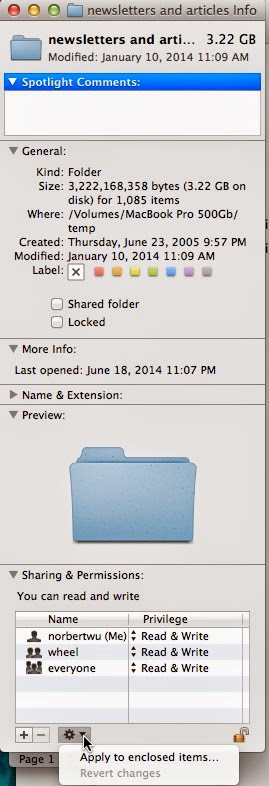
a.  Choose the  original folder, right click and choose "Get Info," click on the lock at the bottom right of the Get Info window (enter your admin password), then choose "Read & Write" for everyone and all other users under Sharing and Permissions.   Then click on the tool wheel at the bottom and choose " apply to enclosed items" in the folder. This might take a long time as all files in the folder will be revised to allow all users to read and write to it.  

b.  I've seen another tip:  

Do you have your Finder preferences set to show all hidden files? Use Tinkertool to do show hidden files.  Remove the .DS_Store file that is causing the trouble.  I have not personally tried this solution yet.  Tinkertool is a free Mac utility that lets you see hidden files on your Mac.  Don't remove or mess with hidden files unless you are a fairly expert Mac user.